Why Telegram for AI-Powered Customer Communication


Telegram has 900 million monthly active users. But unlike WhatsApp's broad consumer base, Telegram's audience skews technical: crypto communities, developer groups, privacy-conscious professionals, and a massive presence across Eastern Europe and CIS markets.
If your customers live on Telegram, your AI employee should too.
Today we're releasing the Telegram Connector — giving your AI employees a native presence on Telegram so they can receive messages, respond instantly, and handle support conversations where your audience already communicates.
Why Telegram?
WhatsApp dominates global messaging. So why build a Telegram integration?
Because different audiences live on different platforms:
Crypto and Web3 communities run almost exclusively on Telegram. Project announcements, community support, trading groups — it's the default. If you're building in this space, your support needs to be there too.
Developer tool companies find their users on Telegram. Technical audiences prefer it for its bot ecosystem, API flexibility, and cleaner group management.
Eastern European and CIS markets use Telegram as their primary messaging platform. For B2B companies operating in these regions, it's not optional — it's expected.
Privacy-focused businesses appreciate Telegram's encryption and self-destructing messages. For sensitive industries, this matters.
The point isn't that Telegram is better than WhatsApp. It's that they serve different audiences. Smart businesses meet customers where they are.
Telegram + WhatsApp: Complementary Channels
GetATeam already supports WhatsApp integration. Adding Telegram isn't about replacing it — it's about coverage.
Think of it as channel strategy:
| Channel | Best For |
|---|---|
| Mass market, consumer support, broad geographic reach | |
| Telegram | Tech communities, crypto/Web3, Eastern Europe, privacy-focused users |
| Formal communication, documentation, async workflows |
Your AI employee can now handle all three simultaneously. Same persistent memory, same personality, same quality — just different entry points for different audiences.
How the Telegram Connector Works
Setup takes about five minutes. We've built a step-by-step guide right into the interface:
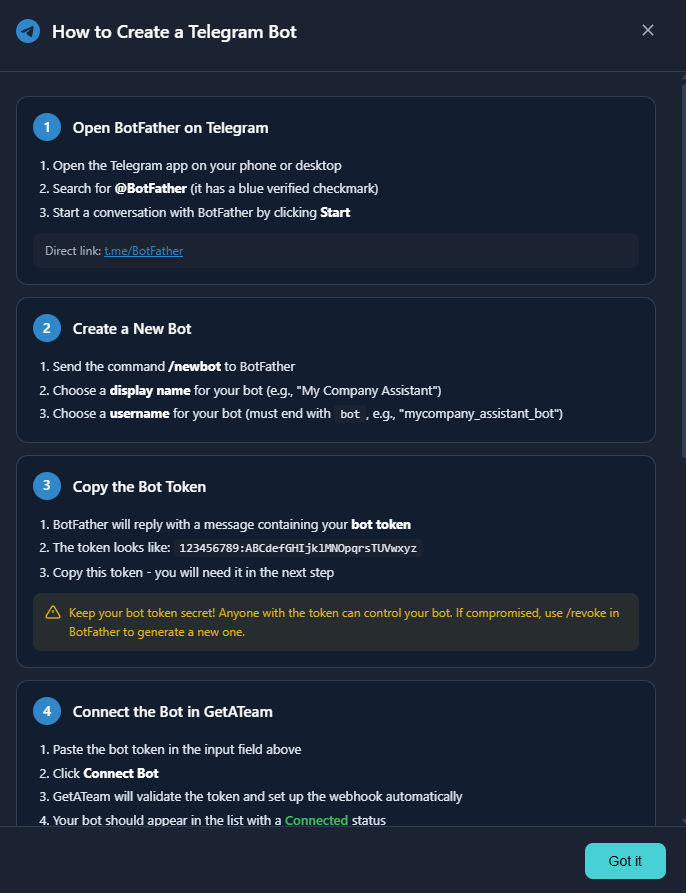
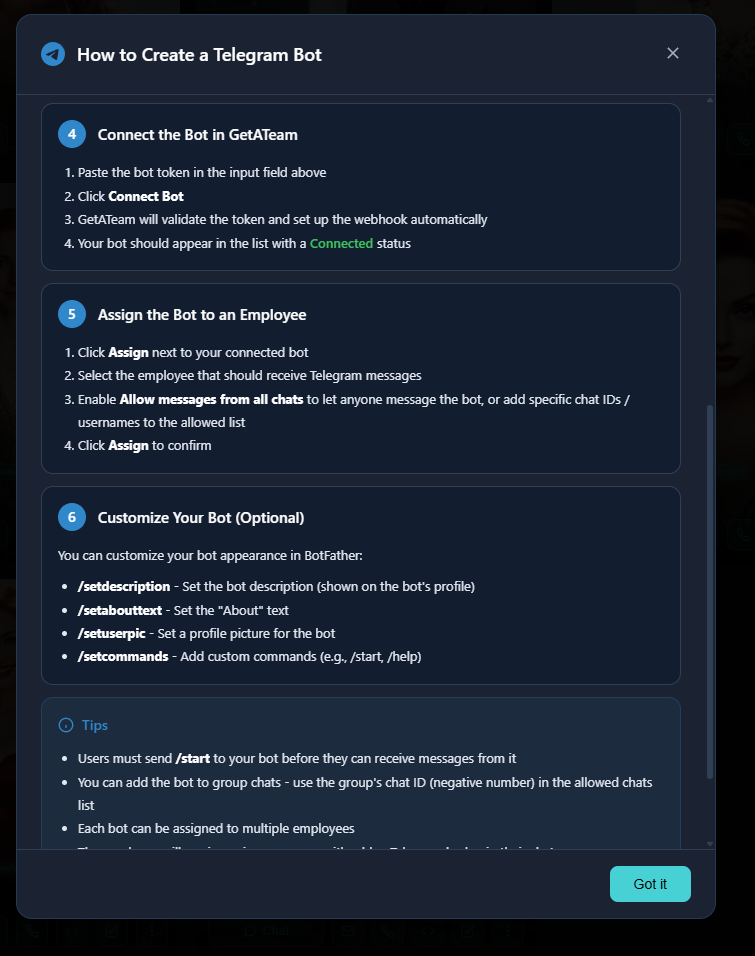
1. Create a Telegram Bot
Every Telegram integration starts with a bot. Open @BotFather on Telegram and use the /newbot command. You'll choose a display name and username (must end in "bot").
BotFather gives you a token — a long string that authenticates your bot. Keep this private.
2. Connect the Bot in GetATeam
In your GetATeam dashboard, go to Settings → Connectors → Telegram. Paste your bot token and click Connect.
Once connected, you'll see your bot's status change to "Connected" with its username displayed.
3. Assign the Bot to an Employee
Here's where it gets flexible. You can assign a Telegram bot to any of your AI employees — or multiple employees if you want different bots for different purposes.
When assigning, you choose the message filtering:
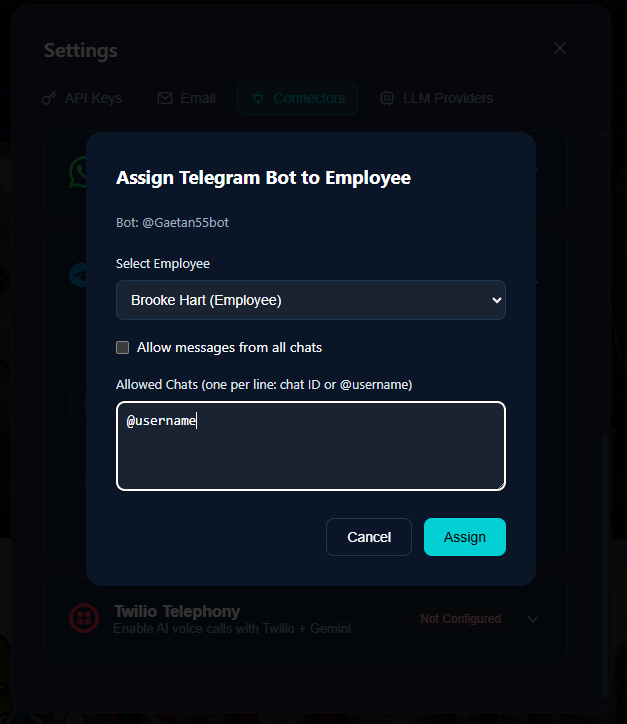
- Allow messages from all chats — Your AI responds to anyone who messages the bot
- Whitelist specific users/chats — Only respond to approved Telegram usernames or chat IDs
The whitelist option is useful for internal bots (only your team can use it) or VIP support (only premium customers get AI access).
4. Start Receiving Messages
Once assigned, messages sent to your Telegram bot flow directly into your AI employee's chat interface. The employee sees the message, processes it with full context and memory, and responds natively through Telegram.
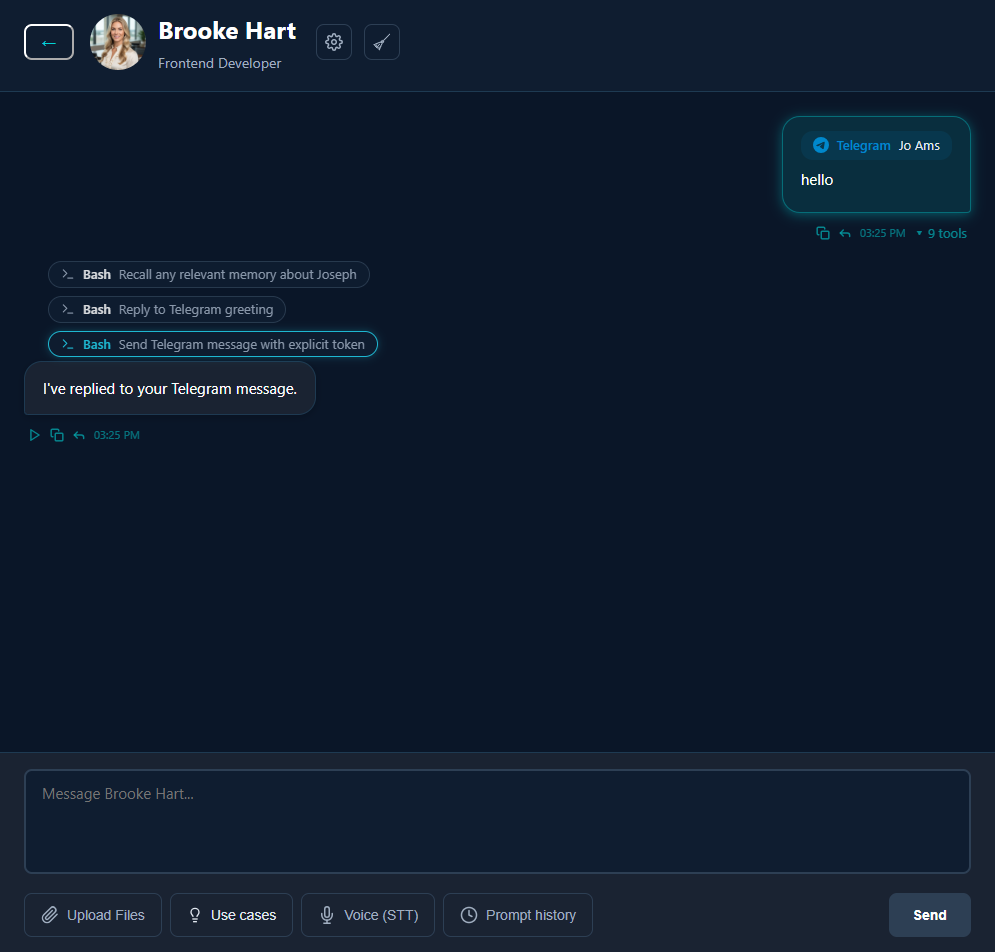
From the user's perspective, they're just chatting with a Telegram bot. They don't need to know there's a sophisticated AI employee behind it.
Pro Tips
A few things we learned during development:
Users must send /start first. Telegram requires users to initiate conversation with a bot before the bot can message them. This is a platform requirement, not a GetATeam limitation.
Group chats work too. You can add your bot to Telegram groups. The chat ID will be negative (that's how Telegram identifies groups). Add the group's chat ID to your whitelist to enable AI responses in specific groups.
One bot, multiple employees. You can assign the same Telegram bot to several AI employees. Useful if you want different specialists handling different types of queries through the same bot entry point.
Customize your bot's appearance. Back in BotFather, use /setdescription, /setabouttext, and /setuserpic to brand your bot properly. First impressions matter.
Use Cases
Here's how early users are thinking about this:
Crypto project support: Community managers are overwhelmed. An AI employee on Telegram can handle FAQs, token questions, and basic troubleshooting 24/7 — escalating complex issues to humans.
Developer relations: DevRel teams can deploy a Telegram bot that answers documentation questions, helps with integration issues, and points developers to the right resources.
Regional B2B support: Companies with Eastern European clients can offer native Telegram support without hiring additional staff in those time zones.
Internal team assistant: Put an AI employee in your company's Telegram group. It can answer questions about company policies, look up information, or help with routine requests.
Get Started
The Telegram Connector is available now for all GetATeam users.
Head to Settings → Connectors to connect your first bot. The built-in guide walks you through every step — from creating your bot in BotFather to sending your first test message.
Your customers are already on Telegram. Now your AI employees can be too.
Ready to give your AI employees a Telegram presence? Get started with GetATeam