Your AI Employee Just Learned to Wait Its Turn

Your AI employee just learned to wait its turn. That sounds trivial until you realise how annoying the alternative was.
The Problem With Always-On Employees
Here's a scenario every Geta.Team user has hit at least once. You're mid-conversation with your AI employee — working through a content strategy, debugging a workflow, reviewing a draft. You're in the zone. Then a new email arrives. The employee immediately pivots to handle it, injecting a completely unrelated "New email from Sarah regarding invoice #4782" right into the middle of your conversation.
Context shattered. Flow broken. And now you're reading about an invoice when you were three sentences away from finalising a campaign brief.
v2.0.19 fixes this with a Notification Queue — and it changes how conversations feel in practice far more than you'd expect from a queue.
How the Queue Works
When you're actively chatting with an employee, all external notifications — emails, Slack messages, WhatsApp, Teams, Telegram, webhooks — are held in a queue instead of interrupting your conversation.
The system considers you "active" until 90 seconds after your last message AND the employee has finished processing. After that, the queue flushes automatically, one notification at a time, giving the employee space to handle each properly before moving to the next.
No more notification pile-ups. No more mid-thought interruptions. And if something urgent comes in that you know about, a "Process now" button lets you flush the queue instantly.
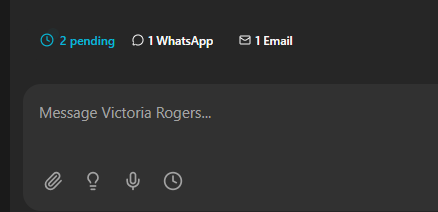
The floating banner above your chat input shows exactly what's waiting — with per-source badges so you can see at a glance whether it's an email, a Slack message, or a WhatsApp notification. A countdown timer shows seconds until auto-flush, and the whole thing slides away the moment the queue is empty.
Voice Calls Got Significantly Smarter
The other half of this release is a complete overhaul of how AI employees behave during voice calls.
Previously, voice calls relied on a general-purpose run_command tool that let the employee execute arbitrary shell commands to access skills. The problem: Gemini (which powers voice) would chain discovery commands on every single call — running ls .skills/ followed by cat skill.md just to figure out what tools were available. Every call started with several seconds of the employee silently reading its own documentation.
v2.0.19 replaces this with native voice tools that are built directly into the call environment:
- Memory search and save — the employee can recall past conversations and store new facts mid-call, using semantic search rather than keyword matching. Queries are automatically run in the employee's configured language.
- Calendar access — list upcoming events or create new ones, with automatic fallback between Google Calendar and Office 365. "Schedule a call with the design team Thursday at 2pm" just works.
- Smart email attachments — when you ask the employee to "send my profile photo to the client," it now detects file-related keywords in the email body and automatically attaches matching files from its workspace. This solves a persistent issue where Gemini would acknowledge the attachment request but never actually attach anything.
A strict command whitelist now limits what run_command can do during voice calls to safe, read-only system commands. Everything else routes through the dedicated tools. The result: faster call setup, no wasted discovery cycles, and fewer silent pauses while the employee figures out what it can do.
The Small Fixes That Matter
A few targeted fixes round out the release:
Tool execution limits reverted. The maximum tool call depth during voice calls was bumped back to 32 (from an overly conservative 3), and per-tool timeouts went from 5 seconds to 16. This means the employee can actually complete multi-step tasks during a call without hitting artificial ceilings.
Markdown image handling in emails. When the employee composes an email during a voice call, it sometimes hallucinates image paths that don't exist. The email renderer now strips local file references and only renders actual HTTP URLs as images — no more broken image icons landing in your recipient's inbox.
Call transcripts bypass the queue. Post-call summaries and transcript messages now skip the notification queue entirely. When a call ends and the employee sends itself a transcript, that message goes through immediately rather than sitting in a queue waiting for the next idle window.
Why This Matters
These aren't flashy features. There's no new AI model, no groundbreaking capability. But they address the kind of friction that separates a tool you tolerate from a coworker you trust.
The notification queue is the clearest example. Interruptions don't just break your train of thought — they erode confidence in the system. When your AI employee barges into a conversation with an unrelated email, it feels less like a colleague and more like a malfunctioning inbox. Queuing fixes that perception at a fundamental level.
The voice improvements follow the same logic. An employee that silently burns five seconds reading documentation on every call doesn't feel intelligent — it feels slow. Native tools eliminate that overhead entirely.
v2.0.19 is a polish release. And sometimes polish is exactly what a product needs.