How to Use OpenRouter with Geta.Team


Geta.Team runs on Claude by default. It's a great model, but sometimes you need something different — a cheaper option for high-volume tasks, a specialized model for coding, or simply access to the latest releases from OpenAI, Google, or Meta without waiting for us to add native support.
That's where OpenRouter comes in.
What is OpenRouter?
OpenRouter is a unified API gateway that gives you access to 300+ AI models from 60+ providers through a single endpoint. Instead of managing separate API keys, SDKs, and billing for OpenAI, Anthropic, Google, Mistral, and others, you get one API key that works with all of them.
The interface is OpenAI-compatible, which means any tool that works with the OpenAI API can use OpenRouter with minimal configuration changes. And if a provider goes down or hits rate limits, OpenRouter can automatically fail over to an alternative.
Why Use OpenRouter with Geta.Team?
Three reasons:
1. Model flexibility. Want to use GPT-5 for complex reasoning tasks and Llama 3 for simple ones? OpenRouter lets you pick the right model for each job.
2. Cost optimization. Some models are dramatically cheaper than others for equivalent tasks. OpenRouter's unified billing makes it easy to experiment and find the sweet spot between cost and quality.
3. Early access. When a new model drops, OpenRouter typically adds it within hours. You don't have to wait for Geta.Team to build native integrations.
How to Configure OpenRouter in Geta.Team
Setting up OpenRouter takes about two minutes. There are two steps: add the provider, then assign it to your employees.
Step 1: Get Your OpenRouter API Key
- Go to openrouter.ai and create an account
- Navigate to Keys in your dashboard
- Click Create Key and copy it somewhere safe
Step 2: Add the LLM Provider
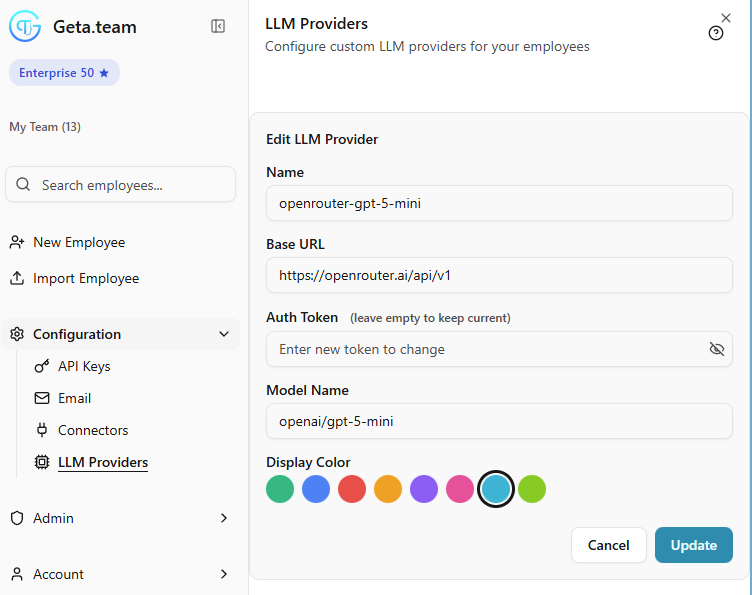
- In your Geta.Team dashboard, go to Configuration > LLM Providers
- Click Add Provider (or edit an existing one)
- Fill in the fields:
| Field | Value |
|---|---|
| Name | Something descriptive (e.g., openrouter-gpt-5-mini) |
| Base URL | https://openrouter.ai/api/v1 |
| Auth Token | Your OpenRouter API key |
| Model Name | The model identifier from OpenRouter (e.g., openai/gpt-5-mini) |
- Pick a Display Color so you can easily identify which provider your employees are using
- Click Update
Step 3: Assign the Provider to an Employee
Once the provider is configured, you need to assign it to your AI employees:
- Click on the employee you want to configure
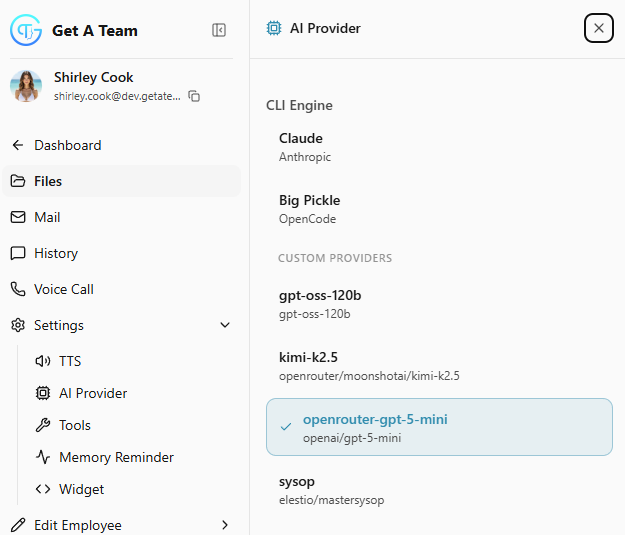
- Go to Settings > AI Provider
- You'll see a list of available providers:
- CLI Engine providers (built-in options like Claude)
- Custom Providers (the ones you've added, including your OpenRouter configuration)
- Select your OpenRouter provider (e.g.,
openrouter-gpt-5-mini) - The change takes effect immediately
Each employee can use a different model based on their role. Your developer might use a coding-optimized model while your customer support agent uses something faster and cheaper.
Finding the Right Model
OpenRouter's model list is extensive. Here are some popular choices:
| Use Case | Recommended Models |
|---|---|
| General tasks | openai/gpt-5-mini, anthropic/claude-sonnet-4 |
| Complex reasoning | openai/gpt-5, anthropic/claude-opus-4 |
| Coding | anthropic/claude-sonnet-4, deepseek/deepseek-coder |
| High volume / cost-sensitive | meta-llama/llama-3.3-70b, mistral/mistral-large |
| Vision tasks | openai/gpt-5, anthropic/claude-sonnet-4 |
Check OpenRouter's model page for the full list with pricing and capabilities.
A Note on Costs
OpenRouter charges per token based on the underlying model's pricing, plus a small margin. You'll see costs in your OpenRouter dashboard, not in Geta.Team. This is the trade-off for flexibility: you manage billing separately.
For most users, the ability to pick the optimal model for each task more than offsets the slight premium over going direct to providers.
When to Stick with the Default
OpenRouter isn't always the answer. If you're happy with Claude's performance and don't need access to other models, the native integration is simpler to manage. But if you want flexibility, cost optimization, or access to the latest models, OpenRouter is the fastest way to get there.
Geta.Team's LLM Providers feature is available on all plans. Questions? Reach out to our team at [email protected].