v2.3.2: Switch Models Without Leaving the Chat, Plus the Voice Bug That Was Erasing Your Agent's Personality


v2.3.2 is a patch release with one feature users have been asking for since the day we shipped multi-model support, one bug that was silently embarrassing the agent on inbound phone calls, and two quieter UX cleanups.
Switch models in the middle of a conversation, without slash commands
A new small badge now sits in the right side of the chat input. On desktop it reads something like "Opus 4.8 · Medium". On mobile it collapses to a brain icon. Click it, and you get a popover with the available models and an effort slider, right there in the same chat you are using. Pick the new combination, and the next message goes to the new model. No container restart, no leaving the chat, no typing slash commands.
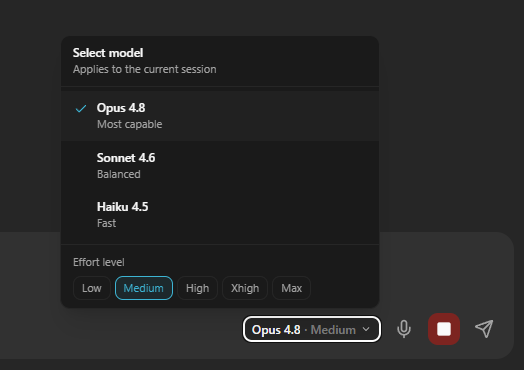
This is a small thing that has been disproportionately friction-y. Until today, switching the model on a live employee meant either typing /model into the chat (which got echoed back as a raw user message and a chunk of XML output) or going through the full Edit Employee flow, which restarts the container and drops your in-flight context. Neither felt right when all you wanted to do was switch to a smarter model for the next reply.
The picker is available for Claude employees and for Custom LLM employees (anything backed by OpenCode). For Custom LLMs, the new selection also persists in the database, so the model survives a container restart and is what the employee comes back on next time. For Claude, the selection lives per-session, so a switch in one tab does not bleed into another.
We also cleaned up the transcript. The slash-command sequence that the picker fires under the hood used to show up in chat as user-side XML tags and an assistant-side console blob. Both are now rewritten into a single clean line: "Switched to Haiku 4.5" or "Effort: medium". You see only the result, the way you would expect.
The voice bug that was making your agent answer calls as "Google AI"
This one was reported by Joseph himself this morning. Inbound phone calls routed through the ElevenLabs voice stack were picking up, the audio sounded fine, the agent could hold a conversation. But the agent had no idea who it was. No personality, no memory of the caller, no tools, no employer context. The user-facing symptom was an agent introducing itself with a generic "Google AI assistant" framing.
The cause is one of those bugs that hides in the corner of a refactor. Inbound voice calls build the agent's full system prompt in parallel with the Twilio WebSocket upgrade, so the prompt compaction does not block the call setup. That work is stored as a Promise. The Gemini Live path correctly awaits that Promise before handing the prompt to the model. The ElevenLabs path did not. It read the resolved-string variant instead, which was undefined for inbound flows, and shipped undefined to Gemini Flash Lite. Given no system prompt, Gemini fell back to its base persona.
The fix is a three-line await that mirrors the pattern from the other two voice code paths. Tested with a fresh inbound call right after the fix: agent answered with full personality, recognised the caller, used its tools normally.
If you noticed your phone agent sounding strangely generic on calls in the last few weeks, this is why. It is fixed now.
A unified phone settings UI
Two parallel UIs existed for editing the same Twilio voice settings. The new one (chat sidebar) had the full feature set, including the Gemini Live vs ElevenLabs voice-stack toggle and the voice picker. The old one (Dashboard, Connectors, Twilio, Edit) had the same data model but a stripped-down UI that was missing the ElevenLabs side entirely. Clicking Edit on a phone number from Connectors now opens the full sheet, the same one as in the chat sidebar. One UI, one set of settings, no more surprises.
Per-employee Google Search toggle on phone calls
Until today, every phone call always included Gemini's live Google Search tool plus a strict fact-checking instruction that forced the model to search for any factual question. That is the right default for some employees and the wrong default for others, especially customer-support personas who should be answering from internal context only.
There is now a checkbox in the phone settings, off by default. When off, the agent will say "j'sais pas trop" instead of running a live web search and risking either an off-brief answer or unnecessary latency. When on, the original fact-checking behaviour is restored. The toggle is per-employee, so you can enable it for the ones where web search makes sense and leave it off for the rest.
Hard refresh to pick up the new version tag.
Want to test the most advanced AI employees? Try it here: https://Geta.Team