What We Shipped: Geta.Team v2.0.20


You know the feeling. You're working with your AI employee, you send a message, and then while it's processing you think of something else. Maybe a follow-up instruction, maybe a correction, maybe a completely different task. But the send button is gone. You're stuck waiting.
Not anymore.
Message Queuing: Talk While They Think
The headline feature in v2.0.20 is a message queuing system. You can now send messages while your AI employee is still processing the previous one. They queue up automatically and get delivered in order once the current task finishes.
This sounds simple. It wasn't.
The send button is now always visible, sitting right next to the stop button. Messages sent during processing go into a pending queue instead of being lost. When the AI finishes its current response, the first queued message fires automatically (800ms delay), and the rest follow sequentially.
A new collapsible UI component sits above the chat input showing your queued messages. In collapsed mode you see the count and a preview ("3 queued messages, update the pricing page, then send it to..."). Click to expand and you get the full list with per-message delete buttons and a "clear all" option if you change your mind entirely.
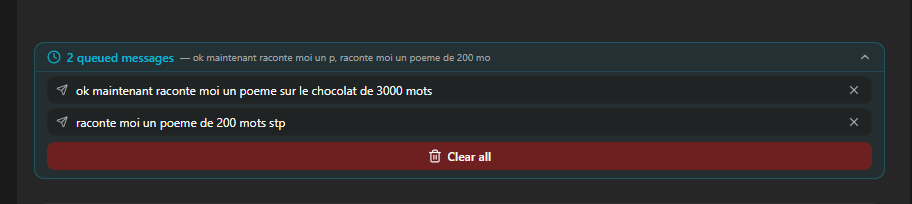
Two details that matter: queued messages persist in localStorage, so they survive a page refresh. And if you reconnect after a brief disconnection, any pending messages automatically resume once the session is ready.
Notification Queue: Now Survives Refresh
The notification queue we shipped in v2.0.19 (where your AI employee batches notifications instead of interrupting you per message) now persists across page refreshes. Previously, refreshing the page cleared the pending notification state. Now the backend sends the queue summary to the client on reconnect, and the frontend persists its state in localStorage too.
We also fixed the debounce countdown timer. It was showing a fake 90-second countdown while the AI was still actively processing, which was confusing. Now it shows a clean "Waiting..." state with a pulse animation during processing, and the real countdown only starts after the AI finishes its current task.
Voice Calls: Gemini 3.1 Flash Live
The voice call model has been upgraded from gemini-2.5-flash-native-audio-preview to gemini-3.1-flash-live-preview. Lower latency, more natural audio.
We also cleaned up the voice selection panel. Removed 19 placeholder voices with Greek mythology names (Zeus, Apollo, Perseus, and friends) and replaced them with the official 30 Gemini voices, properly split by male/female with style descriptions like "Breezy," "Firm," "Upbeat," and "Informative."
Memory Documentation Overhaul
Your AI employee's memory system now has complete documentation for all available commands. The instructions that ship with each employee have been rewritten to include proper guidance on when to use recent (latest entries), recall (semantic search by meaning), and search (full-text keyword search).
The skill catalog entry was also fixed to match the current syntax. This runs as a startup migration, so all existing employees get the updated documentation automatically.
The No-Subagent Rule
This one's subtle but important. AI employees are now instructed to never spawn sub-agents or background agent tasks unless explicitly asked to. This prevents the occasional scenario where an employee would spin up a parallel research agent for a simple question, burning tokens and adding latency for no real benefit. The employee stays focused, uses its own context, and only delegates to sub-agents when you specifically request it.
Want to test the most advanced AI employees? Try it here: https://Geta.Team