v2.7.5: The Claude 5 Lineup Lands, and Fable Access Is Yours to Grant


Every release note about "you can now pick a model" tends to bury the part that actually matters to whoever pays the bill. So let us put it up front: v2.7.5 gives your team the full Claude 5 lineup, adds the brand-new Fable 5 for your hardest work, and then hands you the controls to decide exactly who gets to spend on it. Power and governance, shipped together.
The Claude 5 lineup, in one picker
The model picker (that small "Opus · Medium" badge under the chat) now carries the current generation of Claude models, so you can match the model to the job instead of running everything on one setting:
- Opus 5 is your everyday workhorse for complex tasks, and it stays the default.
- Fable 5 is the most capable of the set, built for your hardest, longest-running work.
- Sonnet 5 is the efficient pick for routine tasks that do not need the heavy lifting.
- Haiku 4.5 is the fastest, ideal for quick answers where speed beats depth.
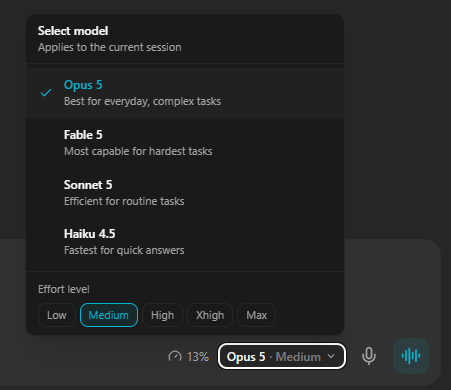
Switching stays live and per-session, exactly as it worked before. Change models mid-conversation, and the choice sticks for that session. Clear or relaunch a session and it comes back on Opus, so there are no surprises about where you start.
Why does this matter beyond novelty? Because model choice is really a cost and quality decision in disguise. Drafting a quick reply does not need the same horsepower as reasoning across a 40-step research task. Giving your employees the right tier for each moment is how you keep quality high on the work that needs it and costs sane on the work that does not.
Fable access, on your terms
Fable 5 is genuinely powerful, and it is token-hungry to match. Handing every user unrestricted access to the most expensive model in the lineup is how monthly bills quietly balloon. So in v2.7.5, Fable access is controlled per user, and you hold the switch.
Here is how it works:
- Off by default. New and existing regular users cannot select Fable unless you grant it. Nobody lands on your most expensive model by accident.
- You decide who gets it. In Manage Users, expand any user and flip the new Fable Access toggle. Once it is on, that user and all of their employees can choose Fable.
- Admins and the owner always have it. The workspace owner and admins keep Fable automatically, so the people running the workspace are never locked out of their own tooling.
- Clean everywhere. Users without access simply do not see Fable in the picker. And if anything tries to switch to it anyway, the request is refused server-side. There is no back door onto the model by accident or otherwise.
This is the pattern we keep coming back to at Geta.Team: capability should never arrive without control. A model that can burn through tokens on your behalf is exactly the kind of thing an admin should be able to gate, per person, without turning off the feature for the whole team.
See who is spending, and how much
Granting access is only half the story. To manage a budget you have to be able to see it, so the admin Usage Overview now treats Fable as its own line item rather than folding it into a single blended number.
- A dedicated Fable quota bar. Fable has its own weekly usage limit, and the Usage Overview now shows a Fable (weekly) progress bar right next to your existing 5-hour and weekly Claude bars. You can tell at a glance how much of the Fable allowance is left before you go looking for it.
- Per-employee and per-user breakdowns. The overview now surfaces Fable Tokens and Fable Msgs columns in the Global Totals, on every individual employee, and on every user, sitting next to the token columns you already know. When the Fable line climbs, you can see precisely who is driving it.
- Accurate across sessions. Fable usage is tallied per day from the full session history, so the numbers stay correct even after a user clears and restarts a session. No resets hiding real spend.
Put the access toggle and the tracking together and you get something most teams never had with AI tooling: a clean answer to "who is using the expensive model, and is it worth it." That is the difference between a feature you hope is not being abused and one you can actually manage.
One fix worth calling out
Alongside the model work, we corrected a real bug in admin controls. The Can Invite Users and MFA toggles in Manage Users could silently fail to apply because of a query issue. They now update reliably every time. If you set a permission and it did not seem to take before, this is why, and it is fixed.
The bigger picture
Under the hood, this release moved the model list off the old hardcoded labels, stored per-user Fable access on the user record, and enforced it both in the picker and at the model-switch layer so it cannot be bypassed. That plumbing is invisible in daily use, which is the point.
What you feel instead is simple. Your team gets access to the best of the Claude 5 generation, matched tier by tier to the work in front of them. And you, as the admin, get to decide who reaches for the most powerful model and watch exactly what it costs. That balance, more capability with more control, is how AI employees stay both genuinely useful and genuinely affordable as your team grows.
v2.7.5 is live now. If you run a workspace, take two minutes in Manage Users to decide who should have Fable, then keep an eye on that new weekly bar. Your future self, and your budget, will thank you.